
We boutta Rick the Matrix mate!
/ EDIT :
Oi mate, I do hosting a small Matrix instance using Synapse for a small group of frens, and we just stump opon a big fahking Federation issues and its fahking annoying so i do made this blog as a reassemble of the fix we walking through as much as possible
So, this blog has 2 parts, for 2 different problem set as follows:
-
auth_errorin significant event causing Synapse to reject any new Federated Messages -
Migrating old events from old homeserver to the new one
auth_error in significant event causing Synapse to reject any new Federated Messages
Before we getting into anything deeper, Let’s see how Matrix Protocol validate events first.
PDUs
Each room event is contained in a PDU(Persistent Data Unit), and EACH PDU CONTAINS EXACTLY ONE EVENT. And with prev_events that reference to previous events thus creating a “Directed Acyclic Graph”(DAG) Linking all events in the room1.
Each PDU is signed with originating server’s private key before getting wrapped inside a transaction sent to each homeserver2. And in order to validate the PDU that was sent to our Homeserver, it has to pass the following mechanism as defined in Matrix Specification v1.183 :
- [v1.16++] Is a valid event? otherwise it is dropped. For event to be valid, it has to comply with Format of the Room version
- Passes signature checks? dropped
- Passes hash checks? redacted before being processed further
- Passes authorization rules based on the event’s auth events? rejected
- Passes authorization rules based on the state before the event? rejected
- Passes authorization rules based on the current state of the room? “soft failed”
- [v1.18++] Is validated by the Policy Server? if the room is using a Policy Server, otherwise it is “soft failed”
Authorization rules
Now that PDU has passed the validation, by protocol, it still requires an additional check, Authorization rules, these are to determine whether or not an event is authorized. For our scope, we will focus on the auth_events field of the PDU, that references a set of events that give sender permission to send the event.
Except for m.room.create event, the auth_events typically include following room state4:
m.room.createthe event where this room was createdm.room.power_levelsdefine minimum level user must have in order to perform specific action (this is where Room permission or roles like admin, moderation etc. are define)m.room.memberspecify information regards sender. There still could be additional auth_events based onm.room.memberevent state. More info
Rejection
if event is rejected5:
- No relay to client
- No included as a prev event in any new events(generated from our homeserver)
- Ok if event from external server referred to rejected event but pass
auth_rules - State check, but not update state event if the rejected event is state event
Despite being rejected, its block data and event should still kept6 in the database
Now that’s all we should know to be able to identify the clause, and fix of the problem that going to be describe next.
So…. It all start with a single m.room.power_levels event from one of our mod, somehow get rejected with auth_error by my Homeserver. And i started to missing majority of new messages in that group chat, except some homeserver that i still able to communicate with, despite that i’m still able to send messages/attachment to federation.
Investigation
WARNING - _process_incoming_pdus_in_room_inner-311-random_event - While checking auth of '<'FrozenEventV3 event_id=random_event, type=m.room.message, state_key=None, outlier=False> against auth_events: 403: During auth for event random_event: found rejected event power_levels_event in the state
These are samples from hundreds of error logs that occur like a chain. But all error events lead to the same power_levels_event, so we know what we should look into now
Before we get into the Synapse’s database. The table below represents events table schema in the database, which was taken from the SQLite 7 schema file. While there are 2 types of schema files available, SQLite and PostgreSQL, there shouldn’t be any difference in term of functionality. View full schema Here
Matrix Synapse events schema
events schemaAs of Synapse version v1.151.0: SQLite
| NAME | TYPE | CONSTRAINTS / DEFAULTS |
|---|---|---|
| stream_ordering | INTEGER | PRIMARY KEY |
| topological_ordering | BIGINT | NOT NULL |
| event_id | TEXT | NOT NULL, UNIQUE |
| type | TEXT | NOT NULL |
| room_id | TEXT | NOT NULL |
| content | TEXT | |
| unrecognized_keys | TEXT | |
| processed | BOOL | NOT NULL |
| outlier | BOOL | NOT NULL |
| depth | BIGINT | NOT NULL, DEFAULT 0 |
| origin_server_ts | BIGINT | |
| received_ts | BIGINT | |
| sender | TEXT | |
| contains_url | BOOLEAN | |
| instance_name | TEXT | |
| state_key | TEXT | DEFAULT NULL |
| rejection_reason | TEXT | DEFAULT NULL |
The initial auth_error:

Figure 1: The initial auth_error event that causing auth_error chain. Image via events table in Synapse database
-
As marked in an image, the initial
m.room.power_levelsevent by room admin, and somehow accepted by other homeserver but not ours -
As a result, new federated event now reference to rejected
m.room.power_levelsevent also getting rejected too
We also learned that rejected event are only indicated by rejection_reason column and in rejections table
Data inside rejected event:
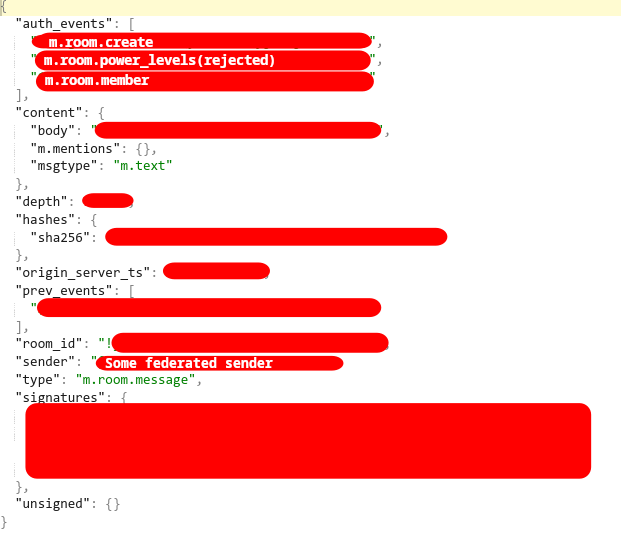
Figure 2: Sample json block from one of event in auth_error chain. Image via json column in event_json table in Synapse database
This explains why most of the new federated events are getting rejected. This is due to how the Matrix protocol works as defined in an earlier state of the blog.
Not just that, this also indicated that the event and event data are still being kept in the database even if the event itself is rejected. This paves the way for the possibility of recovering event states from the so-called Tashbin!
Despite all that, there are still 2 edge cases for this theory, one is matrix.org event still being accepted together with 1 independent homeserver. Another event sent from our homeserver is still being accepted in federation in spite of the auth_error chain going on.
-
How
matrix.organd 1 independent homeserver event are accepted?With love to the power of federation and decentralization of the Matrix Protocol,
matrix.orginstance still references the globally acceptedm.room.power_levels. While the independent homeserver is using Tuwunel and still reference to the initialm.room.power_levelsevent of the room created years ago, which can neither confirm whether these are expected or anti-rejection event mechanism. But as a result, all events from those 2 homeservers are accepted nevertheless -
How event sent from our homeserver still being globally accept during the
auth_errorchainAlso, thanks to the power of the federation, rejected state events are not getting updated to the current one, so the event is still being sent using the old
m.room.power_levels. That made the new event outgoing from our homeserver still being accept globally despite incoming not being!
Database Doctoring
Since there aren’t any documented ways to fix auth_error, or it wasn’t intended to be fixed. Whatever, in this final part, I’ll walk through my steps of how i recovered the rejected event, for it to finally be exposed to the client in chat history and to prevent newer federate event from getting rejected again!
And as there aren’t any documented fix, we are going to do it the old school way. And that’s direct SQL manipulation! 😀. Our plan is to nullify any reference to rejection in the events table and remove the entry in the rejection table, as if nothing ever happened.
Starting from this point are gonna be dangerous and could bring irreversible damage to your database IF NOT BACKUP BEFORE DOING ANYTHING, and also don’t believe everything I said, as it might work for me, but it may not work for YOU!
⚠️YOU HAVE BEEN WARNED⚠️
NOTE: Parts of this guide is using function that is exclusive to SQLITE(only effected the strftime)
1. Check for auth_error in our room from dates before incident
auth_error in our room from dates before incidentFirst, we start by checking for auth_error event within our database. I decided to check from dates before incident to be able to see bigger visual of the event states, like the actual initial event of the error chains
We did this because in our case, m.room.power_levels was changed more than once after initial error event, and with more and more times we let auth_error events happen under the radar, more complex clean up operation gonna be.
Likewise Synapse error log only referred to current m.room.power_levels events in console, it is more reliable if we look into the error chain from bigger pictues instead
Now before going through with step 2, don't forget to pick your target event_id which we will perform a forcefully removal of rejection status, by start from there
SELECT *
FROM events
WHERE room_id = 'room_id'
  AND rejection_reason = 'auth_error'
  AND origin_server_ts > strftime('%s', 'start_date') * 1000;
I leave it here just in case you want to looking into specific event_id
SELECT *
FROM events
WHERE room_id = 'room_id'
  AND event_id = 'event_id';
2. Check for rejections in rejections table
rejections tableNot just in events table, Synapse also keep rejection event within rejections table! Which idk why, but it does contained almost exactly same data as in events table but with an additional last_check column
This gonna be ridiculous step for SQL wizard outhere, but since there is no room_id in the rejections table and i don't want to go that deep in coding for this task since it a small instance and i trusted my mate, so what we are planning to do is just gonna remove all rejection altogether starting from our event_id. But before going through with that in the next step. I'd like to get a glimpse of what we gonna remove first 😂
SELECT * FROM rejections WHERE event_id = 'event_id';

SELECT *
FROM rejections
WHERE rowid > (
    SELECT MIN(rowid)
    FROM rejections
    WHERE event_id LIKE 'event_id%'
)
ORDER BY rowid;
3. set rejection_reason to NULL in events table
rejection_reason to NULL in events tableas stated earlier, one of the way to get missed federated event shown up and not just new event, is to erase any traces of auth_error chain in the room entirely
and by setting rejection_reason to NULL for the event, theoretically should make events expose to client and is no longer deem as invalid events
UPDATE events
SET rejection_reason = NULL
WHERE room_id = 'room_id'
  AND rejection_reason = 'auth_error'
  AND origin_server_ts > strftime('%s', 'start_date') * 1000;
4. Delete rejected events from rejections table
rejections tableWhile old federated messages might starts to shown up, as a result from previous step. But rejections table still has entries for m.room.power_levels event, that made new federated event still get reject as auth_error
DELETE FROM rejections WHERE event_id = 'event_id';

DELETE FROM rejections
WHERE rowid > (
    SELECT MIN(rowid)
    FROM rejections
    WHERE event_id LIKE 'event_id%'
);
In closing, I’d like to apologize for not being able to determine the actual cause of the initial error, as several days had passed before the investigation began. Additionally, due to Docker Compose’s default behavior, logs are overwritten on each restart—and this instance had already been restarted multiple times beforehand T_T.
I promise to handle it better next time if this rare issue occurs again
But, being able to recover the rejected events and successfully accept federated events again is still a win 🙂
Migrate old events from old homeserver to the new one
I had 2 Synapse homeserver, one in domain A, another in domain B, both of them in the same room, but in different timeline.
I want to ditch domain A, but i’d lost ~100k of events prior to me joining the room from domain B, and I don’t want that
The concept for Room DAG in Synapse is that Events are normally sorted by both topological_ordering and stream_ordering where stream_ordering == depth. Also stream_ordering is auto increment of 1, while backfill is decrement of 1 after -18
And events schema tell us exactly what we needed. So waste no more times, our migration plans is,
-
First, any missing events from database_source in database_target, for that specific room. Will get copy over with
topological_orderingremains the same, butstream_orderingwill +1 from current index of database_target, despite the recommend approaches for backfill is-1--but I don’t care -
Then, copies the following entry from these table where
event_idmatches:event_jsonevent_edges(DAG)event_authstate_eventsevent_to_state_groupsevent_searchover to database_target
In our implementation, the database is SQLite. The code for this implementation can be seen here, also FULL DISCLOSURE, it was written by Claude under my guidance. And for full Transparency, prompt is here9.
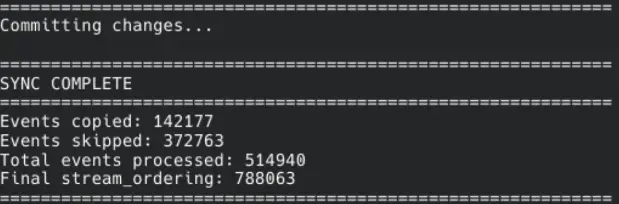
Figure 3: The script final stats. Image via sync script
Now, for the record, over ~142k events were successfully imported into the new database. And while I cannot provide any room images with respect to members’ privacy. But I’d say chat logs dating back to who knows when are safe in the new database and are able to be accessed from Element! Trust me bro
-
https://spec.matrix.org/v1.18/server-server-api/
↩︎Like email, it is the responsibility of the originating server of a PDU to deliver that event to its recipient servers. However PDUs are signed using the originating server’s private key so that it is possible to deliver them through third-party servers.
-
https://spec.matrix.org/v1.18/server-server-api/#checks-performed-on-receipt-of-a-pdu ↩︎
-
https://spec.matrix.org/v1.18/server-server-api/#auth-events-selection ↩︎
-
https://spec.matrix.org/v1.18/server-server-api/#rejection ↩︎
-
https://spec.matrix.org/v1.18/server-server-api/#rejection
↩︎Info:
This means that events may be included in the room DAG even though they should be rejected.
-
https://github.com/element-hq/synapse/blob/v1.151.0/synapse/storage/schema/main/full_schemas/72/full.sql.sqlite ↩︎
-
https://element-hq.github.io/synapse/latest/development/room-dag-concepts.html?highlight=backfill#depth-and-stream-ordering ↩︎
-
Claude prompt
↩︎Write scripts to compare two SQLite3 databases that should have the same schema (Matrix Synapse). Then filter the process to a specific room. In the `events` table, the `event_id` column refers to the events we may need, and the events are ordered by `topological_ordering` with the condition `WHERE room_id = "ourroomid"`. What we need to do is compare `dbinput` with `dbtarget`. For each `topological_ordering`, check whether it exists in `dbtarget`. If it does not, copy that event into the target database. **Important:** When copying, do **not** copy the original `stream_ordering`. Instead, assign a new `stream_ordering` value by incrementing (`+1`) from the current highest index in the `events` table of the target database. Then, copy the corresponding row from `event_json` where the `event_id` matches. Repeat this process for all `event_id` values across every relevant table, which those are `event_json` `event_edges` `event_auth` `state_events` `event_to_state_groups` `event_search`